
Workflow Automation Explained: Tools, Benefits, and Real-World Use Cases

Wilton Rogers July 10, 2025 Workflow Automation Explained: Tools, Benefits, and Real-World Use Cases What Is Workflow Automation? Workflow automation refers to the design and execution of a sequence of tasks or actions that are automatically carried out by software or AI tools without manual intervention. It helps businesses streamline repetitive processes, reduce delays, and ensure tasks are completed consistently and accurately. A workflow can span a single department, like auto-assigning leads in a CRM, or connect several departments, such as triggering a welcome email series after a customer signs a contract and alerting the finance team to generate an invoice. Whether you’re running a small team or managing complex enterprise operations, workflow automation is key to efficiency. Why It Matters: Top Benefits of Workflow Automation Automating workflows brings both immediate and long-term value: Speed and Consistency: Workflows execute instantly, reducing lag and human error. Team Productivity: Employees spend less time on manual tasks and more time on meaningful work. Customer Experience: Automation ensures prompt responses and smooth service delivery. Process Visibility: Many tools offer real-time dashboards to monitor progress. Scalability: Automated workflows can handle increasing workload without hiring more staff. These benefits make workflow automation not just a convenience but a competitive advantage in today’s digital economy. Tools You Can Use to Automate Workflows Thanks to the rise of no-code and low-code platforms, you don’t need a technical background to implement workflow automation. Some popular tools include: Zapier – Connects over 5,000 apps to automate simple workflows. Make (formerly Integromat) – Visual interface ideal for complex logic. Trello Automation / Butler – Great for task boards and project management. HubSpot Workflows – CRM-based automation for marketing, sales, and service. Power Automate – Microsoft’s tool for automating across Office 365 and beyond. Each tool has strengths depending on your business size, systems, and use cases. Real-World Use Cases for Workflow Automation Workflow automation isn’t just a theoretical concept; it’s actively transforming how teams work in the real world. Businesses across industries are turning to automated workflows to improve consistency, reduce manual labor, and deliver better results. Here’s how workflow automation shows up in practical settings: Workflow automation can be applied in virtually any business function. Here are some real-world examples: Sales: Auto-route leads based on form answers, send follow-up emails, update CRM records. Customer Support: Create tickets from chatbots, auto-assign to agents, trigger surveys after closure. HR and Onboarding: Automatically send offer letters, onboard documents, schedule orientation. Finance: Trigger invoice generation after contract signing, automate expense approvals. Marketing: Launch email campaigns when a lead downloads a guide or attends a webinar. These workflows not only save time but also reduce the chances of errors, missed follow-ups, or duplicated efforts. By clearly defining the rules and sequence of steps in a process, teams can stay aligned and consistent, especially as workloads scale. In fact, many businesses that begin with individual workflows eventually progress toward more comprehensive process improvements. If you’re wondering how to go beyond isolated automations and take a more strategic approach, read our article on How to Automate Your Business Processes Without Writing a Single Line of Code. It walks you through low-barrier ways to build and launch automations even if you have no technical background. Want to Take It a Step Further? If you’re already exploring workflow automation, you might be ready for a broader transformation with Business Process Automation (BPA). BPA allows you to integrate multiple workflows across departments, create intelligent logic, and scale your operations more effectively. 👉 Explore more in our Ultimate Guide to Business Process Automation to understand how it can power sustainable growth across your business. Need help building your first workflow automation? Visit ScaleThroughAutomation.io to schedule a free discovery session and get expert guidance tailored to your business needs. AI Agent Workflow Automation Explained: Tools, Benefits, and Real-World Use Cases Business Business Process Optimization vs Automation: What You Need to Know Business Business Process Optimization vs Automation: What You Need to Know Categories Uncategorized Business AI Agent
Business Process Optimization vs Automation: What You Need to Know

Wilton Rogers July 10, 2025 Business Process Optimization Vs Automation: What You Need to Know Not All Efficiency Is the Same In the drive to make operations more efficient, two terms often come up, business process optimization and business process automation. While they’re related, they’re not interchangeable. Understanding the difference can help you apply the right approach at the right time, and get better results. This article will break down both concepts, show where they overlap, and explain how they work together to improve productivity, scalability, and profitability. What Is Business Process Optimization? Business Process Optimization (BPO) is the strategic practice of reviewing, analyzing, and improving existing workflows to eliminate inefficiencies and enhance outcomes. It focuses on making processes better; streamlining steps, removing redundancies, and redesigning how tasks are performed. For example, a company may discover that customer service tickets are taking too long because they go through multiple unnecessary approvals. Optimization would involve revising the workflow to reduce steps, clarify roles, or adjust routing rules. Key goals of process optimization include: Reducing delays and bottlenecks Improving the quality of outputs Enhancing resource allocation Aligning processes with business goals It’s a critical step before automation; automating a broken process just makes it faster to fail. What Is Business Process Automation? Business Process Automation (BPA) uses technology to execute recurring workflows or tasks without manual intervention. It’s about doing work faster, more consistently, and with fewer human errors. Examples include: Auto-generating invoices after contract approval Routing tasks to the correct department based on form inputs Sending reminders or approvals automatically via integrated tools While automation doesn’t necessarily fix a flawed process, it amplifies the efficiency of a well-optimized one. That’s why many businesses pair BPA with optimization initiatives. 👉 For a complete breakdown of BPA and its strategic value, read our Ultimate Guide to Business Process Automation. Optimization vs Automation: Which Comes First? In most cases, optimization should come before automation. Here’s why: Automation locks in a process, so you want that process to be the best version possible. Optimized workflows are easier and more cost-effective to automate. Automating a wasteful or redundant process just replicates inefficiency at scale. That said, in some cases, automating a basic version of a process can reveal inefficiencies more clearly. Think of optimization and automation as iterative partners; they work best when they feed into each other. To see how automation works in specific business functions, explore our article on Workflow Automation Explained: Tools, Benefits, and Real-World Use Cases. It breaks down practical applications across sales, HR, finance, and more. They work best when they feed into each other. When to Use Each One (or Both) Use Business Process Optimization when: You’re unsure why a process is slow or underperforming You want to simplify workflows before scaling You’re onboarding new team members and need clarity Use Business Process Automation when: You already have a clear, repeatable workflow in place You’re scaling up and need to reduce manual workload You want to boost speed and eliminate repetitive tasks Use both when: You’re building sustainable systems for long-term growth You want to unlock maximum efficiency and ROI The Smartest Move? Combine Optimization with Automation The most forward-thinking businesses use optimization and automation together. First, they fix what’s broken. Then they automate what works. This combined approach delivers powerful outcomes: Lower costs Higher output with the same or smaller team Better customer experiences Improved scalability If you’re just starting out, don’t feel pressured to get everything perfect before you begin. Start small, improve as you go, and remember: the best automation is built on strong processes. Want help reviewing or automating your business workflows? Visit ScaleThroughAutomation.io to book a free consultation with our automation experts. 10 Jul 2025 Business Business Process Optimization vs Automation: What You Need to Know 08 Jul 2025 Business Business Process Optimization vs Automation: What You Need to Know 07 Jul 2025 Business The Ultimate Guide to Business Process Automation: How Modern Businesses Scale Efficiently Categories Uncategorized Business AI Agent
Business Process Optimization vs Automation: What You Need to Know
Wilton Rogers July 8, 2025 Business Process Optimization Vs Automation: What You Need to Know Not All Efficiency Is the Same In the drive to make operations more efficient, two terms often come up, business process optimization and business process automation. While they’re related, they’re not interchangeable. Understanding the difference can help you apply the right approach at the right time, and get better results. This article will break down both concepts, show where they overlap, and explain how they work together to improve productivity, scalability, and profitability. What Is Business Process Optimization? Business Process Optimization (BPO) is the strategic practice of reviewing, analyzing, and improving existing workflows to eliminate inefficiencies and enhance outcomes. It focuses on making processes better; streamlining steps, removing redundancies, and redesigning how tasks are performed. For example, a company may discover that customer service tickets are taking too long because they go through multiple unnecessary approvals. Optimization would involve revising the workflow to reduce steps, clarify roles, or adjust routing rules. Key goals of process optimization include: Reducing delays and bottlenecks Improving the quality of outputs Enhancing resource allocation Aligning processes with business goals It’s a critical step before automation; automating a broken process just makes it faster to fail. What Is Business Process Automation? Business Process Automation (BPA) uses technology to execute recurring workflows or tasks without manual intervention. It’s about doing work faster, more consistently, and with fewer human errors. Examples include: Auto-generating invoices after contract approval Routing tasks to the correct department based on form inputs Sending reminders or approvals automatically via integrated tools While automation doesn’t necessarily fix a flawed process, it amplifies the efficiency of a well-optimized one. That’s why many businesses pair BPA with optimization initiatives. 👉 For a complete breakdown of BPA and its strategic value, read our Ultimate Guide to Business Process Automation. Optimization vs Automation: Which Comes First? In most cases, optimization should come before automation. Here’s why: Automation locks in a process, so you want that process to be the best version possible. Optimized workflows are easier and more cost-effective to automate. Automating a wasteful or redundant process just replicates inefficiency at scale. That said, in some cases, automating a basic version of a process can reveal inefficiencies more clearly. Think of optimization and automation as iterative partners; they work best when they feed into each other. To see how automation works in specific business functions, explore our article on Workflow Automation Explained: Tools, Benefits, and Real-World Use Cases. It breaks down practical applications across sales, HR, finance, and more. They work best when they feed into each other. When to Use Each One (or Both) Use Business Process Optimization when: You’re unsure why a process is slow or underperforming You want to simplify workflows before scaling You’re onboarding new team members and need clarity Use Business Process Automation when: You already have a clear, repeatable workflow in place You’re scaling up and need to reduce manual workload You want to boost speed and eliminate repetitive tasks Use both when: You’re building sustainable systems for long-term growth You want to unlock maximum efficiency and ROI The Smartest Move? Combine Optimization with Automation The most forward-thinking businesses use optimization and automation together. First, they fix what’s broken. Then they automate what works. This combined approach delivers powerful outcomes: Lower costs Higher output with the same or smaller team Better customer experiences Improved scalability If you’re just starting out, don’t feel pressured to get everything perfect before you begin. Start small, improve as you go, and remember: the best automation is built on strong processes. Want help reviewing or automating your business workflows? Visit ScaleThroughAutomation.io to book a free consultation with our automation experts. 12 Jul 2025 Business What Is Process Automation and How Can It Save Your Business Time and Money? 12 Jul 2025 AI Agent How to Scale a Business Without Scaling Your Team Using Automation 12 Jul 2025 AI Agent Data Automation for Businesses: From Collection to Insight in Minutes Categories Business AI Agent
The Ultimate Guide to Business Process Automation: How Modern Businesses Scale Efficiently
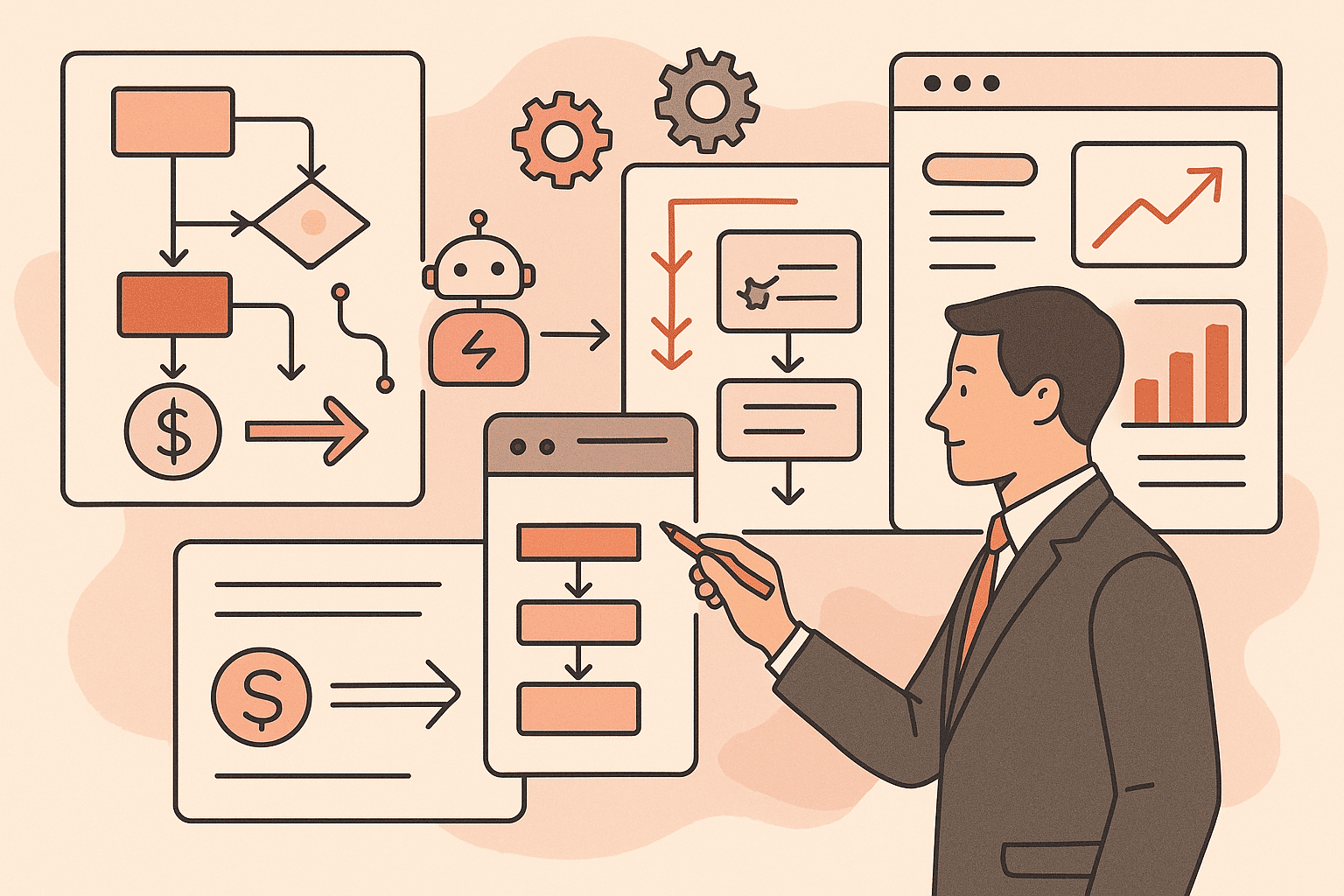
Wilton Rogers July 7, 2025 The Ultimate Guide to Business Process Automation: How Modern Businesses Scale Efficiently What Is Business Process Automation? Business Process Automation (BPA) refers to the use of technology to execute recurring tasks or processes in a business where manual effort can be replaced. It’s about making workflows more efficient, scalable, and streamlined. From invoice approvals and data entry to onboarding and customer communication, BPA focuses on eliminating bottlenecks, reducing errors, and freeing up human resources for more strategic tasks. Unlike simple task automation, such as using a script to send daily emails, BPA covers entire workflows end-to-end, integrating various tools and systems to create seamless operations. Key benefits of BPA include: Time savings and increased speed Reduced operational costs Improved accuracy and consistency Better customer and employee experiences 👉 Related Reading: [What Is Process Automation and How Can It Save Your Business Time and Money?] Why Automation Is Crucial for Scaling Your Business As your business grows, managing operations becomes more complex. Manual processes that once worked well for a small team often become inefficient and unsustainable. Business Process Automation allows companies to manage increasing demand without hiring more staff by creating scalable systems that operate efficiently. Automation enables businesses to: Serve more clients with fewer resources Respond faster to customer demands Leverage real-time analytics for better decision-making Deliver consistent service and gain a competitive edge 👉 Related Reading: [How to Scale a Business Without Scaling Your Team] Key Areas You Can Automate in Your Business There are several high-impact areas in your business where automation can drive measurable improvements: Operations: Automate task assignments, approvals, purchase orders, and document routing to streamline administrative workflows and ensure compliance. Sales and Marketing: Use automation for lead scoring and nurturing, running email campaigns, and managing social media posting. This frees up your team for strategy and engagement. Customer Service: Implement AI-powered chatbots to handle FAQs, triage support tickets, and provide updates, allowing staff to address more complex needs. Data and Reporting: Automate report generation, data cleaning, platform syncing, and real-time alert setups for smarter, data-driven decisions. 👉 Related Reading: [Workflow Automation Explained: Tools, Benefits, and Real-World Use Cases] Getting Started with Business Process Automation Starting with automation doesn’t have to be complicated. Here’s a simple 4-step approach: Identify Repetitive Tasks: Look for high-volume, error-prone processes such as email replies, form handling, or data updates. Prioritize Based on ROI: Choose automation targets based on time/cost savings and implementation ease. Select the Right Tools: Platforms like Zapier, Make, and Power Automate offer easy integrations. AI-powered tools add another layer of intelligence. Monitor and Optimize: Measure outcomes such as time saved, error reduction, or ROI. Use these insights to improve further. If you’re unsure where to begin or feel overwhelmed by the options, Scale Through Automation (STA) can support you every step of the way. Our experts help businesses like yours choose the right tools, implement powerful workflows, and ensure a smooth transition into automated systems without the guesswork. Avoid Common Pitfalls: Automating inefficient processes without first improving them Skipping team training and onboarding Overcomplicating your first automation project Related Reading: [How to Automate Your Business Processes Without Writing a Single Line of Code] Why Business Process Automation Is the Future of Growth Business Process Automation is more than a tech trend; it’s a strategic advantage in today’s digital-first world. Whether you’re a small startup or a growing enterprise, automating intelligently gives you the freedom to innovate, reduce human error, and build systems that scale with your ambition. Want help identifying what to automate first? Book a free consultation with our automation experts at ScaleThroughAutomation.io and explore smart solutions for your business. 12 Jul 2025 Business What Is Process Automation and How Can It Save Your Business Time and Money? 12 Jul 2025 AI Agent How to Scale a Business Without Scaling Your Team Using Automation 12 Jul 2025 AI Agent Data Automation for Businesses: From Collection to Insight in Minutes Categories Uncategorized Business AI Agent
How to Reduce Manual Tasks Without Breaking Your System

Wilton Rogers June 16, 2025 How to Reduce Manual Tasks Without Breaking Your System The Smart Way to Automate Without Wrecking What Already Works Every growing team eventually hits the same wall: “We’re spending too much time on repetitive tasks, but we can’t risk breaking our current systems.” Sound familiar? Whether you’re in real estate, retail, accounting, manufacturing, or client services—the fear is real: automate the wrong way, and you’ll create more mess than magic. Here’s the good news:You don’t need to overhaul everything. You just need to automate with intention. Let’s walk through how to reduce manual tasks without breaking what already works. 1. Start With Process Mapping, Not Tools Before you even think about software, pause. Ask yourself: What tasks are eating up the most time? Where do handoffs break down? What’s being done manually that could be done better? Map your workflows first. This can be as simple as drawing boxes and arrows. The goal is to see your current system clearly—so you can automate the right parts, not the wrong ones. 🧠 Pro Tip:Use sticky notes, whiteboards, or tools like Lucidchart, Whimsical, or even Google Docs. Visibility creates clarity. 2. Pick One Process That’s Easy to Win Don’t automate everything at once. Choose one high-impact, low-risk task—something small, annoying, and repeatable. Examples across industries: Real Estate: Automate rent reminders or showing confirmations E-commerce: Auto-send order status updates or follow-ups Accounting: Use forms that auto-feed into QuickBooks Customer Service: Route common inquiries with a chatbot Manufacturing: Auto-generate inventory alerts or shift schedules Start here. Test. Measure. Build confidence. 3. Use Tools That Integrate, Not Overcomplicate One of the biggest mistakes? Adding new tools that don’t play well with your existing stack. Instead, look for systems that: Connect to your CRM, calendar, email, or spreadsheets Don’t require a full migration Let you build automation in layers, not leaps Popular tools that work with you: Zapier (for no-code automation between apps) Make (Integromat) (for complex workflows) ChatGPT/AI agents (for emails, reports, and triage) CRMs like GoHighLevel, HubSpot, or Zoho (that have built-in automation) 4. Automate for Support, Not Separation Automation is not about replacing people or distancing yourself from the process—it’s about giving your team more bandwidth to do what humans do best. Let the bots handle: Data entry Scheduling Notifications Routine follow-ups Let your team focus on: Strategy Relationships Decisions Creative problem-solving Automation done right brings clarity, not confusion. 5. Test Small, Learn Fast, Then Scale Here’s a simple rollout plan: Automate one task Observe the results Ask: did this save time, reduce errors, or improve flow? Refine and document the process Train your team before scaling to more areas Automation isn’t “set it and forget it”—it’s “test it, tweak it, then trust it.” Final Thought: You don’t need to be tech-savvy to reduce manual tasks.You just need to be process-smart and willing to start small. Your systems don’t have to break to improve. They just need room to grow—with automation as your ally. ✅ Ready to Spot Your First Automation Opportunity? Let us show you exactly where to start.👉 Schedule a Free Automation Assessment 16 Jun 2025 Business How to Reduce Manual Tasks Without Breaking Your System 16 Jun 2025 Uncategorized How to Reduce Manual Tasks Without Breaking Your System 12 Jun 2025 Uncategorized How to Automate at Scale: A Blueprint for Growing Businesses Without Growing Headaches Categories Uncategorized Business AI Agent
How to Automate at Scale: A Blueprint for Growing Businesses Without Growing Headaches
What Does It Mean to Automate at Scale? In today’s fast-moving digital economy, businesses of all sizes are turning to automation to save time, reduce errors, and stay competitive. But while many organizations start with small, isolated automation projects, like setting up email responders or auto-generating invoices; the real transformation happens when you automate at scale. To automate at scale means deploying automation technologies not just in one or two areas, but across your entire business ecosystem. It’s about integrating tools, workflows, and systems in a way that allows your operations to grow without increasing your manual workload or headcount. Instead of just streamlining a few tasks, you’re building a scalable infrastructure that runs efficiently even as your customer base, product offerings, or data volume expands. Small Automation vs. Scalable Automation Scalable automation doesn’t just make life easier; it redefines how your business operates. Why Automate at Scale? If small automation saves you time, then automating at scale saves your business. Key Benefits of Automating at Scale The Impact on Growth and Customer Experience When you automate at scale, you’re not just making your internal processes more efficient; you’re also enhancing the experience for your customers. Faster response times, fewer mistakes, and more personalized interactions lead to greater satisfaction and loyalty. Moreover, automation allows your business to scale rapidly without scaling costs at the same rate. That means whether you’re serving 100 customers or 10,000, your systems can handle the load without breaking. In short, automating at scale empowers your business to do more with less, while delighting customers and driving sustainable growth. Signs Your Business Is Ready to Automate at Scale Knowing when to automate at scale is just as important as knowing how. Here are three clear signals that your business is ready to make the leap: 1. Operational Bottlenecks Are routine processes slowing down your operations? If delays in approvals, data processing, or customer responses are becoming frequent, it may be time to automate. Bottlenecks are often early indicators that your systems can’t keep up with growth, unless they’re scaled. 2. Repetitive Manual Workflows Tasks like data entry, scheduling, follow-ups, or inventory tracking can eat up hours of valuable time. When your team is bogged down with repetitive actions that follow clear, predictable rules, automation can and should take over. 3. Inconsistent Output or Quality If customers are getting different levels of service or your internal reports vary in accuracy, it’s a sign of a system that relies too much on human variability. Automation ensures standardized, reliable processes that deliver consistent quality at every stage. Framework for Automating at Scale Successfully scaling automation isn’t just about adopting new tools; it’s about building a strategy. Here’s a simple 4-step framework to help you automate at scale effectively: Step 1: Identify Core Processes to Automate Begin with high-impact, repetitive workflows that affect multiple departments, like lead qualification, invoice generation, or customer support. Prioritize tasks that are time-consuming and rule-based. Step 2: Choose Scalable Automation Tools Select tools that integrate well with your existing systems and can grow with your business. Look for platforms that offer API connectivity, AI capabilities, and workflow customization. Think beyond temporary fixes; go for tools built for long-term efficiency. Step 3: Build for Flexibility and Integration Don’t isolate your automation. Systems should be able to communicate across departments – sales, support, finance, HR. For example, a CRM should sync seamlessly with your email marketing and billing systems to create an end-to-end automated flow. Step 4: Test, Refine, and Optimize Continuously Launch with a pilot process, gather performance data, and iterate. Automation isn’t “set and forget”; scaling requires monitoring, refining, and adapting as needs evolve or bottlenecks shift. Common Challenges and How to Overcome Them Even the best automation strategies encounter roadblocks. Here’s how to deal with the most common ones: 1. Change Management Employees may resist automation out of fear; fear of losing relevance, making mistakes, or adjusting to new systems. Solution: communicate early, involve teams in the process, and provide clear training and support. Show how automation enables, not replaces them. 2. Tool Overload With so many platforms available, it’s easy to end up with a cluttered tech stack. This can create inefficiencies rather than solve them. Solution: audit your current tools, eliminate overlap, and consolidate around platforms that offer multiple capabilities and integrations. 3. Data Silos When departments use disconnected tools, data becomes trapped in silos, reducing visibility and slowing decision-making. Solution: prioritize tools that allow for real-time data sharing and integrate across your tech ecosystem. Real-World Examples of Businesses That Automated at Scale Successfully Theory is helpful, but nothing drives the point home like real-world success. Here are three brief examples of how companies in different industries used automation to scale their operations and results. 1. Retail: Streamlining Order Fulfillment and Customer Engagement A mid-sized online clothing retailer struggled with slow order processing and inconsistent email marketing. By implementing automation across inventory management, fulfillment, and customer messaging, they reduced order handling time by 40% and increased customer retention by 25%.Tools used: Shopify automation apps, Klaviyo for email flows, Zapier for integration. 2. Healthcare: Automating Patient Intake and Scheduling A growing medical clinic faced appointment no-shows and paperwork backlogs. With automated patient intake forms, SMS reminders, and synced appointment calendars, they cut administrative time in half and improved patient satisfaction scores.Tools used: Jotform, Calendly, and Twilio-based messaging. 3. Service Industry: Automating Client Onboarding and Billing A digital marketing agency handling dozens of clients every month used to manually onboard new customers and manage billing. By building automated workflows from proposal acceptance to invoicing and recurring payments, they scaled client handling by 3x without hiring extra staff.Tools used: PandaDoc, HubSpot CRM, QuickBooks automation. These businesses didn’t just automate; they automated at scale, ensuring each step of their operations was efficient, connected, and scalable. You can also check out our use cases section for a better understanding of how AI and automation in general can be applied in business scaling. Conclusion: Scaling Smart with
AI Agents: Building an Autonomous Backbone for Modern Businesses — 2025 Guide
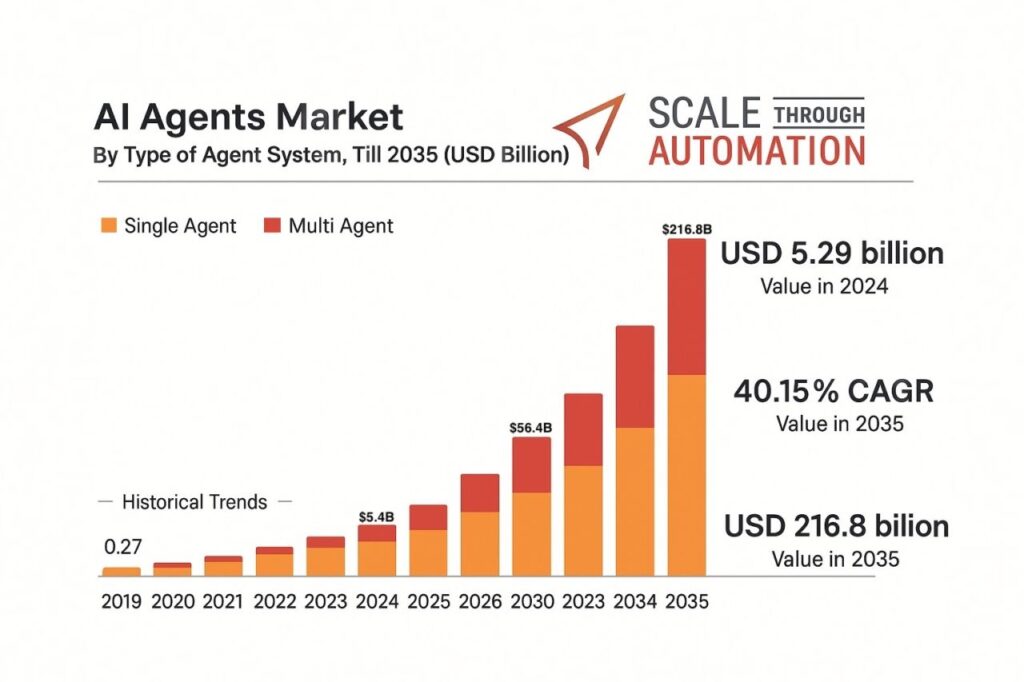
Wilton Rogers May 13, 2025 AI Agents: Building an Autonomous Backbone for Modern Businesses — 2025 Guide 1. The Agentic AI Surge Just 18 months ago, most companies were still experimenting with chatbots; today, AI agents are a $7.6 billion market growing at 45.8 percent CAGR, Warmly analysts expect the space to hit $47 billion by 2030. Research & Markets like GlobeNewswire projects an even steeper climb to $216.8 billion by 2035 as “ready-to-deploy” agents overtake custom builds. However you want to see it, AI Agents are growing at a remarkable rate. Why the rush? Because AI agents aren’t just “smart macros.” They read, reason, predict, and act across systems in real time. McKinsey notes that this year (2025) an agent can “converse with a customer, process payment, check for fraud, and complete a shipment”, all in one autonomous flow (McKinsey & Company). 2. Adoption Is Becoming Ubiquitous 85% of enterprises say they will have agents in production by the end of 2025. (Warmly) Retailers, consultants, banks, and factories report 40-60% productivity lifts once humans work “arm-in-arm” with agentic co-workers. (Warmly) 62% of companies already expect a full 100% ROI or better from deployments launched this year. (Warmly) 3. What Makes AI Agents a Game-Changer? Traditional Automation Modern AI Agents Scripted, rules-only Hybrid: rules + LLM reasoning Static Continuously retrains on live data Handles one task Orchestrates multi-step workflows Weeks of coding Natural-language configuration In plain English: agents shoulder the repetitive, rules-based, and predictive workload so your team can pour energy into relationship-building and creative growth. 4. The 30-Day Deployment Playbook Scale Through Automation routinely spin up 30–40 agents in a single month. A typical rollout looks like this: Discovery (Days 1-5) Map friction points invoice matching, appointment scheduling, lead routing, etc. Data & System Hooks (Days 4-10) Secure API keys, RPA connectors, or database access. Pilot & Refine (Days 11-20) Launch 3–5 high-impact agents, capture edge-case feedback, auto-retrain daily. Scale to 30-40 Agents (Days 21-30) Clone proven templates across departments; set guardrails and dashboards. Because agents are template-driven and cloud-hosted, you skip the months of custom coding common in legacy automation. 5. Hard-Dollar Impact You Can Quote to the CFO Metric Typical Result After 90 Days Service case-handling time ↓ 52 % (ServiceNow benchmark) Warmly Marketing output per head ↑ 60 % productivity Warmly Sales-assisted revenue ↑ 40 % (Verizon pilot) Warmly Operating-cost reduction 25–40 % across support & back-office For many SMBs, that translates to mid-six-figure savings in the first year, often before the final payment on traditional software projects would even be due. 6. “Can My Business Really Do This?” Absolutely. You need only three ingredients: Clear Process Targets – Start with the 20 percent of workflows that burn 80 percent of your team’s time. Secure Data Access – Agents can’t optimize what they can’t see. Prioritize APIs and single sign-on. A Trusted Partner – Our STA framework supplies pre-built agents, integration know-how, and success metrics so your staff doesn’t have to become AI engineers overnight. 7. Getting Started Book a 30-minute “Agent Readiness” call. We’ll pinpoint 3 workflows you can automate in under two weeks. Receive a personalized ROI blueprint—including cost, timeline, and projected savings. Deploy your first agent within 10 days, or your consultation fee is on us. Early adopters will compound their advantage while competitors are still “exploring use cases.” The data is clear: agentic automation is no longer optional; it’s the new foundation of operational excellence. Ready to let AI Agents handle the busywork so your people can double down on customers? Let’s talk. Business Business Process Optimization vs Automation: What You Need to Know Business The Ultimate Guide to Business Process Automation: How Modern Businesses Scale Efficiently Business How to Reduce Manual Tasks Without Breaking Your System Categories Uncategorized Business AI Agent
The End of SaaS? How AI Agents Are Redefining Technology.

Wilton Rogers March 28, 2025 The End of SaaS? How AI Agents Are Redefining Technology. The software industry is on the verge of a major shift—one that signals the potential end of SaaS as we know it. Microsoft CEO Satya Nadella envisions a future where AI agents replace traditional applications and SaaS platforms entirely. These intelligent systems promise to eliminate static interfaces and rigid workflows, creating a more seamless and intuitive way to work. In this blog, we’ll unpack Nadella’s vision, explore how AI agents operate, and discuss what this transformation means for businesses, developers, and the future of technology. The Shift Imagine a world where clunky software interfaces, hours spent learning new applications, and rigid workflows are replaced by seamless, intuitive interactions. Microsoft CEO Satya Nadella envisions exactly this future, a world where AI agents take center stage, replacing traditional software applications and even the dominant Software as a Service (SaaS) model. This shift is not a distant possibility; it’s a rapidly approaching reality driven by advancements in artificial intelligence. Here’s what this transformation means for businesses, developers, and the way we interact with technology. What Are AI Agents, and Why Do They Matter? AI agents are intelligent systems capable of dynamically interacting with databases and executing tasks. Unlike traditional software, which relies on fixed user interfaces and workflows, AI agents adapt to user needs and work without requiring extensive reprogramming or application layers. Examples of AI Agent Capabilities: Customer Data Management: Instead of navigating a complex CRM system, an AI agent could retrieve customer insights, analyze trends, and generate actionable reports in seconds. Workflow Automation: Tasks that once required multiple apps can now be seamlessly handled by AI agents working directly with backend systems. This approach eliminates the need for predefined application layers, offering flexibility and simplicity that static software cannot match. How AI Agents Are Transforming SaaS SaaS platforms revolutionized the software industry by providing user-friendly tools delivered over the internet. However, they still rely on static designs and predefined workflows. AI agents represent the next evolution, bypassing these limitations entirely. Key Differences Between SaaS and AI Agents: This disruption could render traditional SaaS platforms less relevant, pushing the industry toward more dynamic, AI-driven solutions. Implications for Businesses For businesses, the rise of AI agents means streamlined operations and optimized infrastructure. By directly interacting with multiple databases, AI agents eliminate the need for complex integrations and reduce operational inefficiencies. Benefits of AI Agents for Businesses: Efficiency: Perform tasks without switching between applications. Scalability: Adapt quickly to changing needs and workloads. Cost Savings: Reduce reliance on large SaaS subscriptions. Companies embracing AI agents early will gain a competitive edge, positioning themselves for greater innovation and growth. A New Era for Developers The shift to AI agents is not just about technology; it’s also about redefining the role of developers. Instead of building static applications, developers will focus on training AI models and optimizing how they interact with data. How Developers Will Adapt: AI Training: Teaching AI agents to perform complex tasks. Data Management: Ensuring clean, structured databases for optimal performance. System Optimization: Fine-tuning backend systems to support dynamic workflows. This evolution will foster a more creative and strategic development environment, allowing developers to focus on innovation rather than repetitive coding tasks. Microsoft’s Role in Leading the Shift Microsoft is at the forefront of this transformation with tools like Copilot and other AI-native applications. These innovations are not just enhancing productivity; they are reshaping the industry by demonstrating the practical potential of AI agents in real-world scenarios. Examples of Microsoft’s AI-Driven Innovations: Copilot: Assisting users with tasks across platforms. AI-Native Tools: Introducing systems designed from the ground up for AI integration. Microsoft’s efforts signal a broader industry movement, highlighting the importance of adapting to this new era. https://youtu.be/a_RjOhCkhvQ?list=TLGGGHZs6byoxSEyODAzMjAyNQ Preparing for the Future The end of SaaS as we know it is not the end of technology it’s the beginning of a smarter, more intuitive age. Businesses, developers, and users must embrace this shift to remain relevant and competitive. Whether it’s by integrating AI agents into workflows or acquiring new skills, preparation is key to thriving in this AI-driven world. As Satya Nadella stated, this future is closer than we think. Are you ready to unlock the potential of AI agents and redefine how you interact with technology? 16 Jun 2025 Business How to Reduce Manual Tasks Without Breaking Your System 12 Jun 2025 Uncategorized How to Automate at Scale: A Blueprint for Growing Businesses Without Growing Headaches 13 May 2025 AI Agent AI Agents: Building an Autonomous Backbone for Modern Businesses — 2025 Guide Categories Uncategorized Business AI Agent
How AI Agents are Transforming Small Businesses in 2025

Wilton Rogers March 28, 2025 The AI Revolution: How AI Agents are Transforming Small Businesses in 2025 Imagine a world where your business operates like a well-oiled machine, with tasks being completed efficiently and seamlessly. This is the reality that AI agents are bringing to small businesses in 2025. In this blog, we’ll explore how AI-powered virtual agents, small business automation and optimization strategies, and intelligent automation tools are making a significant impact on smaller enterprises. We’ll also discuss why it’s crucial to adopt this technology and how businesses can avoid being left behind. The Rise of AI Agents AI agents, once a concept of science fiction, are now a practical solution for AI consulting for small businesses. These intelligent systems are capable of automating workflows, analyzing data, and making decisions often with minimal human intervention. For small businesses, this means the ability to compete with larger enterprises by leveraging cutting-edge AI solutions that were once out of reach. Benefits of AI Agents for Small Businesses Efficiency and Productivity AI-driven process improvements can handle routine tasks such as customer inquiries, inventory management, and financial analysis. Employees can focus on strategic initiatives like growth and innovation. Cost Savings Small business automation and optimization reduce labor costs and minimize errors. With fewer manual tasks, teams can allocate their time toward higher-value activities. Improved Customer Experience AI-powered virtual agents for customer support ensure timely, accurate information 24/7. Quick response times lead to better customer satisfaction and retention. Unlock Data-Driven Decisions With AI Tools Discover how AI can transform your business insights and enhance decision making processes efficiently. Overcoming Challenges and Considerations While the benefits of AI agents are clear, SMBs often face hurdles such as limited resources and the need for employee training. Partnering with expert AI consultants can help small businesses navigate these obstacles, optimize their processes, and address data security concerns. With the right automation consulting and strategic investment, these challenges can be overcome. The Future of AI in Small Businesses Looking ahead to 2025, it’s evident that intelligent automation will play a pivotal role in transforming small businesses. Companies that embrace enterprise-level automation on a small business budget and continue to evolve with machine learning solutions for growth will stay competitive. Conversely, businesses that fail to adopt AI and RPA (Robotic Process Automation) risk being left behind in an increasingly tech-driven market. Conclusion: The AI revolution is here, and it’s already reshaping how small businesses operate. By adopting AI agents, companies can improve efficiency, lower costs, and enhance the customer experience. Now is the time to explore AI solutions for small and medium enterprises and remain one step ahead of the competition. Are you ready to embrace AI consulting for small businesses? Start exploring intelligent automation tools today and ensure your business thrives in the future of work. Lets Connect, Wilton Rogers III LinkedIn YouTube TikTok X Instagram 28 Mar 2025 AI Agent The AI Revolution: How AI Agents are Transforming Small Businesses in 2025 Categories Uncategorized AI Agent